Word Hike -Inventive Crossword
- 4.7
- Rating
- 1.00M
- Installs
- Free
- Price
 Analysis by App-foxy
I found Word Hike -Inventive Crossword most enjoyable when I treated it as a quiet daily word game rather than a race to clear as many puzzles as possible. It is a free word game from Joy Vendor, rated for Everyone, and its central appeal is simple: solve crossword-style clues while taking a mental break. The store summary describes it as a way to breathe, relax, and wander through peaceful puzzles, and that mood matches my experience better than the idea of a competitive brain test.
The important distinction is that this is not the right choice for every kind of word-game player. If you want a strict newspaper-style crossword with dense clues and a strong sense of traditional construction, you may find it lighter than expected. If you want something approachable for short sessions, however, it has a useful place in a phone library. I would recommend it especially to people who like vocabulary games but do not want every round to feel stressful.
Getting past the first points of friction
I use the first few sessions to learn what kind of clue-solving rhythm feels comfortable, rather than trying to clear a board quickly. When a clue stalls me, I move to an entry with more crossing letters and return with fresh context; that small change can make the game feel less like a guessing exercise. It also helps me decide whether this gentle format suits my downtime before I settle into a longer routine.
You May Also Like

 Blood Strike: 2.5 Anniversary
Blood Strike’s Loadouts Turn Every Drop Into a Tactical Gamble
A close look at Blood Strike’s custom loadouts: how fast access to signature weapons reshapes its battle royale rhythm, rewards preparation, and narrows the gap between fights.

 Pandora - Music & Podcasts
Pandora’s Music Is Easy to Start, but Harder to Recover
Pandora’s strength is its low-effort path from a seed to a station. Its weak spot is how much confidence it asks you to place in connection, setup, and quiet recovery.

 8 Ball Pool
 Is Built on Rivalries, Rematches, and Routine
A close look at the rivalries, rematches, shared routines, and unanswered safety questions that turn a quick pool match into a persistent mobile community.

 Samsung Music
’s Quiet Strength Is Playing What You Already Own
Its reach comes less from spectacle than from dependable access to a personal library. That simplicity is both the app’s strongest retention engine and its ceiling.

 AccuWeather: Weather Radar
AccuWeather Review: A Quick, Clear Forecast for Everyday Decisions
For everyday plans, the best forecast is the one you can understand quickly. AccuWeather makes rain timing, radar, and local conditions easy to act on, with a few trade-offs.

 Hill Climb Racing
Why Hill Climb Racing Still Turns Crashes Into One More Run
A tiny car, a bumpy hill and one more upgrade: Hill Climb Racing keeps resurfacing because its simple chaos makes every near-miss feel personal.
More From Our News Desk



What can make the opening feel less smooth
The first hurdle with a casual puzzle game is often not the puzzle itself. It is deciding how much attention to give it. Because the presentation is designed around relaxation, I found that the game works best when I started with a few minutes available instead of opening it while rushing between tasks. A hurried attempt can make ordinary clue-solving feel more difficult than it really is.
Another common sticking point is expectation. The name suggests an inventive crossword experience, but players coming from a full-size newspaper crossword should not assume that every challenge will use the same level of clue subtlety or structure. I approached each board as a compact vocabulary exercise. That made the game feel more consistent and helped me judge a difficult clue on its own terms instead of comparing it with a different crossword format.
The game is free to download, which makes trying it straightforward. It does include optional in-app purchases ranging from $0.99 to $99.99 per item, so I would advise deciding early whether you want to play without spending or are comfortable considering extras as they appear. A free game can still be enjoyable without purchases, but knowing your own boundary prevents an otherwise relaxing session from turning into an unwanted buying decision.
Simple setup checks before blaming the puzzle
Word Hike supports Android devices running version 7.0 or later. If it does not install or open properly, the first practical check is the operating-system version rather than the puzzle content. On an older phone, I would also make sure there is enough free storage and that the device is not struggling with several demanding apps running at the same time.
For a clean start, I would close the game completely, reopen it, and give the initial loading process time to finish. If the screen appears frozen, tapping repeatedly is usually less useful than waiting briefly and then trying one deliberate action. Casual games can feel unresponsive when the phone is busy, and repeated taps may create a second problem once the interface catches up.
It is also worth checking whether the phone has a stable connection when the game is first being opened or updated. I would not assume that every problem is caused by the puzzle engine. A weak connection, a paused system update, or low available storage can interrupt the experience before the actual wordplay begins. These are ordinary checks, but they save time because they separate an installation issue from a clue-solving issue.
The current version is 2.14.6, and keeping the installed version current is a sensible first step when something behaves unexpectedly. I would update through the normal app marketplace, restart the device if the update seems incomplete, and then test the game again before changing anything more drastic. Clearing app data or reinstalling can affect local progress, so I would treat those actions as later steps rather than casual experiments.
How I use the game without creating unnecessary friction
My preferred routine is to begin with the clues that immediately suggest an answer and leave uncertain spaces alone. That sounds obvious, but it changes the whole rhythm. An easy answer gives crossing letters that narrow the possibilities for a harder clue, while staring at one vague clue can make the session feel stalled. The best workflow is therefore not to solve in the order the board presents the clues.
I also avoid entering a guess simply because it fits the number of spaces. In a word game, a plausible answer can create confusion later if it does not match the crossings. When I am uncertain, I use the surrounding letters as a filter: part of the answer, its grammatical form, and the clue’s likely meaning matter together. This is more reliable than treating each clue as an isolated trivia question.
A useful habit is to stop after a small block of progress instead of forcing the final few answers. The game’s relaxed identity works in its favor here. Leaving a stubborn clue for later gives the vocabulary in my head time to settle, and I often return with a better interpretation. This is one of the strongest reasons I see for using it during a break, before bed, or while waiting somewhere, rather than as a single long challenge.
Recovering a session when progress feels stuck
When I get stuck, I first inspect the board for an answer with several known letters. Solving that entry can unlock multiple crossings and is usually more productive than spending several minutes on the most mysterious clue. I then reread the difficult clue with the new letters in place. A clue that seemed broad at the beginning can become surprisingly narrow once its pattern is visible.
If the interface appears to ignore an input, I check whether the selected space is actually active and whether the keyboard or answer area has finished responding. I avoid rapidly switching between clues because that makes it harder to tell whether the problem is a missed tap, an incorrect selection, or a temporary delay. A deliberate tap, a short pause, and one new entry give a clearer diagnosis.
Restarting the app is a reasonable recovery step when the screen remains unresponsive. I would first make sure I remember where I was in the puzzle, then close and reopen it normally. If the same issue returns, I would check for an available update and restart the phone. Only after those steps would I consider reinstalling, because preserving progress matters more than performing a dramatic fix that may not address the cause.
There is also a mental recovery workflow that works particularly well here. I write down, mentally or on paper, the clue pattern I already know, then move to another activity for a few minutes. When I come back, I do not begin by repeating the same guess. I look at the clue’s wording, part of speech, and crossing letters from the beginning. That small reset is often more effective than using a hint immediately.
Separating game problems from phone problems
Not every interruption belongs to Word Hike. If the whole phone is slow, other apps are also closing, or touch input is unreliable across the device, I would investigate the phone first. Restarting it, closing unused apps, and checking available storage are sensible general steps. A single word puzzle should not be blamed for a system-wide performance problem.
The same applies to network behavior. If other applications cannot load content, the connection is the more likely suspect. I would test the device with another ordinary app before repeatedly reinstalling the game. If everything else works and only this title has a persistent issue, then updating or contacting the developer becomes more reasonable than changing phone settings at random.
Battery-saving modes can also affect how smoothly an app resumes after being left in the background. I would test the game after opening it fresh rather than assuming that returning to an old session will always behave identically. This is especially useful on an older device that manages memory aggressively. The goal is not to disable every system safeguard, but to identify whether the problem follows the app or the phone’s current state.
For account or purchase concerns, I would keep the distinction clear between gameplay and the marketplace handling the transaction. A puzzle that loads normally but has a purchase-related question should be approached through the platform’s standard purchase and support tools, while a crash or stuck board is an app-performance matter. Separating those paths makes support requests more precise and avoids changing settings that have nothing to do with the issue.
Who gets the most from this format
I think the strongest audience is someone who wants a gentle word habit. It suits players who enjoy finding connections between clues, building answers from crossing letters, and taking a pause without committing to a large campaign. The Everyone content rating also makes it a reasonable family-friendly option in principle, although individual preferences for clue difficulty and reading level will still vary.
It can also work for people returning to word puzzles after a long break. The compact, approachable format gives you room to rebuild confidence without requiring advanced crossword knowledge from the first minute. I would use it as a warm-up before harder puzzles, especially on days when I want to exercise vocabulary but do not want a demanding test.
There is a practical use case for shared downtime too. One person can read a clue aloud while another suggests possibilities, turning a solo game into a small cooperative activity. That works best when nobody treats the answer as a contest. The relaxed tone supports discussion, and the crossing letters give both players something concrete to work with.
On the other hand, I would skip it if your main goal is competitive ranking, timed pressure, or highly specialized vocabulary. It is also not my first recommendation for someone who wants a puzzle editor, deep customization, or a formal learning course. The value here is the steady act of solving, not a broad toolkit around crossword construction.
How it compares with familiar alternatives
Compared with a traditional newspaper crossword, Word Hike feels more suitable for short, low-pressure sessions. A newspaper-style puzzle often rewards knowledge of conventions, obscure references, and long-form persistence. This game is easier to fit into a spare moment and less intimidating when I do not want to reserve a whole sitting for one grid.
Compared with a word-search game, it asks for a different kind of attention. Word searches are primarily visual scanning exercises, while crossword-style clues make me interpret meaning and use the letters I have already earned. If you enjoy spotting hidden words quickly, a word search may feel more immediate. If you prefer reasoning from a clue and confirming an answer through crossings, this format has more substance.
It also differs from fast anagram games. Anagrams reward speed and rapid rearrangement, whereas this experience gives me more reason to pause and reconsider a clue. That makes it a better fit for winding down, but a weaker fit for players who want constant urgency or a score-driven rush. Choosing between them depends less on which game is objectively better and more on whether your current mood calls for calm deduction or quick reaction.
The rating of 4.7 from around 59 thousand ratings suggests that the broad audience response has been very positive, and the game has passed the million-install mark. I see those figures as useful signs of reach, not proof that every player will enjoy the tone. The same gentle pacing that attracts many people may disappoint someone looking for a punishing crossword challenge.
Small habits that improve the experience
My first practical tip is to play with a stopping point in mind. I might solve a few clues during a coffee break and close the game before the session becomes repetitive. That keeps the relaxation angle intact and makes it easier to return later. Treating every unsolved clue as an obligation works against the game’s biggest strength.
My second tip is to use errors as information rather than irritation. When an answer does not fit, I ask which assumption failed: the word meaning, the spelling, the number of spaces, or one of the crossing answers. This turns a wrong entry into a diagnostic tool. It is especially helpful when several answers seem possible and prevents me from replacing a whole section of the board unnecessarily.
My third tip is to keep purchase decisions separate from puzzle momentum. If an optional item appears while I am stuck, I pause and decide whether I genuinely want it rather than treating it as the price of continuing. Since individual in-app items can range from $0.99 to $99.99, that pause is worthwhile. A calm game should not pressure me into making a rushed choice.
Finally, I would keep the app in a stable routine on the phone where I actually intend to use it. Avoid opening it during a low-battery emergency, after a major system slowdown, or while the device is installing several updates. Those conditions can make a simple puzzle feel unreliable. A few basic setup checks give the game a fair test and make later troubleshooting much easier.
My practical verdict after using it
Word Hike is a pleasant choice when I want crossword-inspired thinking without the weight of a formal crossword session. Joy Vendor has positioned it as a free, Everyone-rated word game, and I think that description fits its accessible, calming role. The 4.7 average and broad install base make it easy to see why it appeals to many players, but I would still choose based on the kind of challenge you want rather than popularity alone.
I would recommend it to casual puzzle fans, people building a small daily word routine, and anyone who enjoys solving through crossings at an unhurried pace. I would be more cautious about recommending it to expert crossword enthusiasts, competitive players, or anyone who dislikes optional purchase prompts in free games. Those users may be happier with a more demanding or more clearly specialized alternative.
My final advice is to install it with modest expectations, confirm that the Android device meets the minimum requirement, and give the game a few short sessions rather than judging it after one difficult clue. If the relaxed format clicks, it becomes an easy companion for waiting rooms, quiet evenings, and brief mental resets. The best way to enjoy it is to let the puzzle remain a break, not another task to rush through.
FAQs for Word Hike -Inventive Crossword
01What is Word Hike - Inventive Crossword?
Word Hike - Inventive Crossword is an engaging word puzzle game that combines the fun of solving crosswords with the challenge of finding words based on given clues. It's designed to enhance vocabulary and improve problem-solving skills while providing entertainment. Available for both Android and iOS, it’s perfect for word game enthusiasts.
02How does the gameplay in Word Hike work?
In Word Hike, players are presented with crossword-like puzzles where they must find words from a set of letters. Each puzzle comes with clues to guide the player. The goal is to solve the puzzle by filling in the correct words, which can be done by swiping letters to form words that fit the clues.
03Is Word Hike suitable for all ages?
Yes, Word Hike - Inventive Crossword is designed to be accessible and enjoyable for players of all ages. While it offers puzzles that challenge the mind, the game’s interface and mechanics are straightforward enough for younger players, making it a great family-friendly option for educational entertainment.
04Are there in-app purchases in Word Hike?
Word Hike offers in-app purchases that can enhance the gaming experience. Players can buy hints or additional puzzle packs to advance through more challenging levels. While these purchases can aid progression, they are optional, and the game can be enjoyed without spending any money.
05Can Word Hike be played offline?
Yes, Word Hike - Inventive Crossword can be played offline, making it ideal for travel or areas with limited internet connectivity. Players can enjoy solving puzzles anytime, anywhere, without the need for a constant internet connection, ensuring uninterrupted access to their favorite word challenges.
Pros
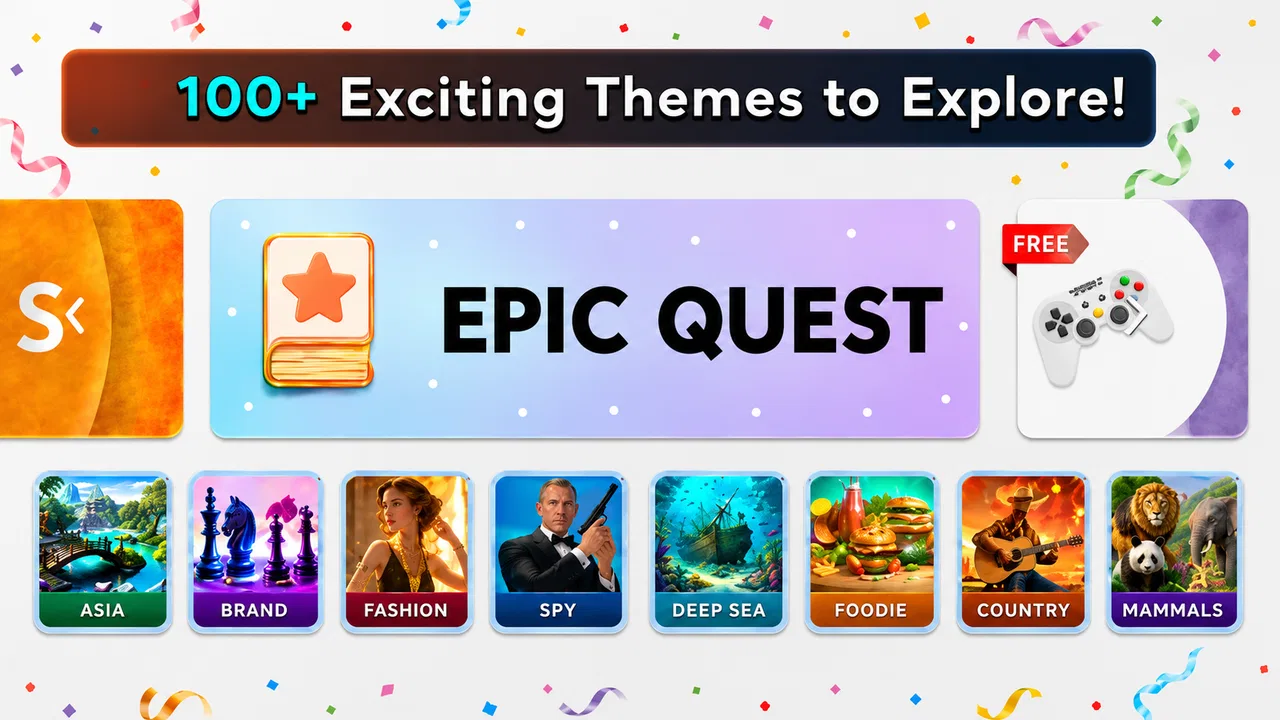
- Engaging puzzles with varied themes.
- User-friendly interface and design.
- Regular updates with new content.
- Offline play mode available.
- Educational and fun simultaneously.
Cons
- Ads can be frequent and intrusive.
- In-app purchases can be pricey.
- Some puzzles may be too easy.
- Occasional hints are vague.
- Limited free hints without purchase.

Word Hike -Inventive Crossword
Gallery